If you run a small business in Fort Worth, your website is probably the first place people go to learn about you. Maybe you own a café, a boutique, or a local service business. Whatever the case, your website sets the tone for your brand. That’s why Web Accessibility & ADA Compliance for Fort Worth Businesses matters more than many owners realize.
Here’s the thing many business owners overlook: web accessibility. If your site isn’t accessible, you could be shutting out potential customers. It could also open your business up to legal risks under the ADA.
This article breaks web accessibility down in plain language so Web Accessibility & ADA Compliance for Fort Worth Businesses feels clear and manageable. You’ll learn:
- What accessibility actually means
- Why it matters for your business, not just ethically
- How to audit and improve your website without a huge budget
- Tips to keep your site accessible as it grows
By the end, you’ll have a clear, practical roadmap to make your website more inclusive, user-friendly, and compliant, helping your Fort Worth business reach more people confidently.
If you want, you can also check Fort Worth Web Design Tips to Boost Sales for actionable advice on optimizing your site for all users.
Why Web Accessibility and ADA Compliance Matter for Small Businesses
You might think accessibility is only for big companies, but that’s not true. Web Accessibility & ADA Compliance for Fort Worth Businesses matters just as much for small, local companies as it does for large brands. Even a small business can face real consequences if its website isn’t accessible. Even a small local business can face real consequences if its website isn’t accessible.
Imagine someone with low vision trying to navigate your website, or a customer who uses a screen reader. If they can’t see or interact with your content, you just lost a potential sale, maybe forever.
Legal Reality
The ADA applies to businesses that serve the public, including through websites. Many courts use WCAG (Web Content Accessibility Guidelines) as a benchmark for compliance. And here’s a surprise for some small business owners:
Most accessibility lawsuits target small and mid-sized businesses.
Settlements can cost tens of thousands of dollars, plus legal fees and remediation. That’s a risk you don’t want to ignore.
Business Benefits
Accessibility isn’t just about avoiding lawsuits. It actually helps your business grow. Here’s how:
- Reach more customers: People with visual, hearing, or motor impairments can use your website. That’s a wider audience than you might think.
- Better user experience for everyone: Clear navigation, readable text, and descriptive links make your site easier for all visitors.
- SEO boost: Search engines love clean headings, alt text, and well-structured content. Accessible sites often rank better.
- Stronger brand reputation: Showing your commitment to inclusivity builds trust with your community.
For Fort Worth businesses, community trust matters. Accessibility can help you stand out and build loyalty with local customers.
Tip: Check your website on a mobile device. Could someone with limited vision or mobility easily find what they need? If not, you’re already starting your accessibility improvements. You can also explore Fort Worth Digital Marketing Tips to Grow Your Small Business for more ways to boost UX and engagement.
Core Standards: Understanding WCAG
WCAG stands for Web Content Accessibility Guidelines. It’s a global standard that explains how to make websites usable for everyone. Think of it as your roadmap.
The Four Principles (POUR)

- Perceivable: Content should be readable or audible. Add alt text for images, captions for videos, and make sure text contrasts with backgrounds.
- Operable: Navigation and functionality must work for everyone. Keyboard-only users should be able to move around easily.
- Understandable: Text, layouts, and forms should make sense. Use clear labels and predictable behavior.
- Robust: Your website should work with screen readers, browsers, and future technologies.
Levels of Compliance
- Level A: Basic accessibility features.
- Level AA: Most public websites should aim here. Balances accessibility with practical implementation.
- Level AAA: Highest level, often unrealistic for small business sites.
For small businesses, WCAG 2.1 Level AA is usually the sweet spot.
Other Standards to Know
- ADA Title III: Applies to businesses open to the public.
- Section 508: Needed if you work with government contracts.
- ARIA: Developer markup that helps screen readers interpret dynamic elements.
Quick Tip: Ask your web designer: “Is this site built to meet WCAG 2.1 AA?” It’s a simple way to keep accessibility on the radar. For more insights, read Website Design Fort Worth: Turn Your Site into a Sales Machine.
Practical Web Accessibility Checklist
Here’s a hands-on list you can start using today to support Web Accessibility & ADA Compliance for Fort Worth Businesses. Focus on your most important pages: Home, About, Services, Contact, and Checkout (if you sell online).
Perceivable
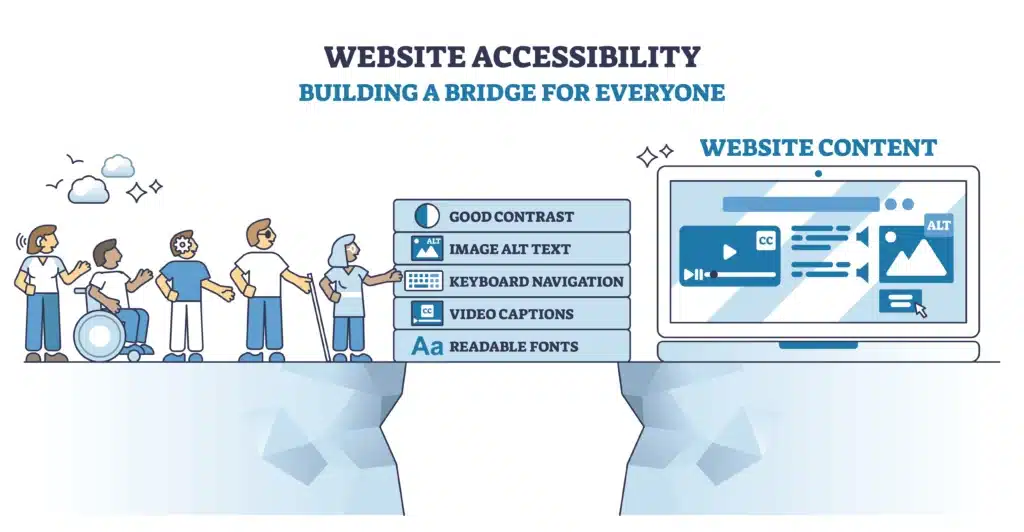
- Alt text for all images: Describe images like you’re reading them to someone over the phone.
- Captions/transcripts for videos: Helps people with hearing challenges.
- Readable color contrast: Avoid light gray text on white or low-contrast combinations.
- Resizable text: Ensure zooming doesn’t break your layout.
Operable
- Keyboard navigation: Make sure all buttons, menus, and forms work without a mouse.
- Visible focus indicators: Shows users where they are on the page.
- Skip-to-content links: Helps screen reader users jump to the main content.
Understandable & Robust
- Use proper headings and semantic HTML: H1, H2, UL/LI, etc.
- Descriptive link text: Avoid vague links like “click here.”
- Accessible forms: Label every field and provide clear error messages.
- Accessibility statement: Add a short statement about your commitment to accessibility and how visitors can contact you about issues.
Action Step: Pick one page today and run through this checklist. Fix what you can, then plan the next page. For more detailed design strategies, see Fort Worth Web Design That Inspires Growth in 2025.
How Fort Worth Small Businesses Can Get ADA-Compliant
Accessibility doesn’t have to be scary or expensive. There are simple steps to make your website compliant.
Start With Free Tools
Browser extensions and online checkers can flag basic issues like missing alt text or poor contrast. Many common problems are easy to fix yourself.
When to Hire a Professional
If your site has interactive features or lots of pages, consider an experienced developer or agency. They can:
- Run full audits
- Fix code-level issues
- Provide documentation for compliance
Think of it as insurance. A small investment now can save thousands later. For guidance on choosing the right partner, read How to Choose the Right Fort Worth Digital Marketing Partner.
Keep Accessibility Ongoing
Every new blog post, image, or plugin can introduce new issues. Regular checkups even quarterly will help you stay compliant. Keep a simple log of what you fixed and when. Over time, it makes maintenance easier and cheaper.
Tip for Fort Worth businesses: Treat accessibility as part of your content workflow. Add alt text and labels as you create content, not after.
Conclusion
Web accessibility is not just a technical requirement. It’s about making sure everyone can use your website comfortably and confidently. When you focus on Web Accessibility $ ADA Compliance for Fort Worth Businesses, you’re doing more than reducing legal risk. You’re creating a better experience, reaching more customers, and building trust with your community.
The good news is that accessibility does not have to be overwhelming. Small, thoughtful improvements like adding alt text, improving contrast, labeling forms, and checking keyboard navigation can make a meaningful difference. When Web Accessibility & ADA Compliance for Fort Worth Businesses becomes part of how you maintain your website, it supports long-term growth instead of feeling like a one-time fix.
If you’re not sure where to start or want help auditing and improving your site, Panther City Marketing can help. We work with Fort Worth businesses to identify accessibility gaps, make practical updates, and build websites that are inclusive, user-friendly, and compliant as they grow.

Accessibility is an investment in your customers and your brand. And when you’re ready to take the next step, PCM is here to guide you through it with clear advice and real-world solutions.
💬 What Our Clients Say
“Megan is a MASTER of Marketing — she just GETS IT!!! She is Creative, Attentive, Responsive AND Responsible!!! A great TEAM player, she is awesome to BRAINSTORM with our creative team at Cuffs to explore new avenues not previously considered and we LOVE her! Having managed several projects for us, she adds value by bringing her expertise to the table timely and professionally!! Love working with her! FIVE STARS!!!!” — Cynthia S. ⭐️⭐️⭐️⭐️⭐️
FAQs
Q: What’s the difference between WCAG, ADA, and Section 508?
A: WCAG is a technical guide for accessibility. ADA compliance is the legal requirement. Section 508 applies to federal agencies or contractors. Most businesses use WCAG as a practical benchmark.
Q: Do all small businesses need to meet WCAG Level AA?
A: Not strictly, but public-facing U.S. businesses should aim for it. It fixes most accessibility barriers and reduces legal risk.
Q: What are the easiest fixes for small business websites?
A: Add alt text, captions for videos, clear contrast, keyboard navigation, semantic markup, and proper form labels. These go a long way.
Q: Can I just use an accessibility overlay plugin?
A: No. Overlays may fix minor issues, but they don’t handle deep problems like semantic structure, ARIA, or forms.
Q: How often should I audit my website?
A: Every time you add content, redesign pages, or add new plugins. For active sites, a quick monthly check plus a deeper quarterly audit is ideal.
Reference
ADA.gov –Webinar: Americans with Disabilities Act Title II Web & Mobile Application Accessibility Rule